How Do You Detect an Unwanted Bluetooth Tracker Following You?
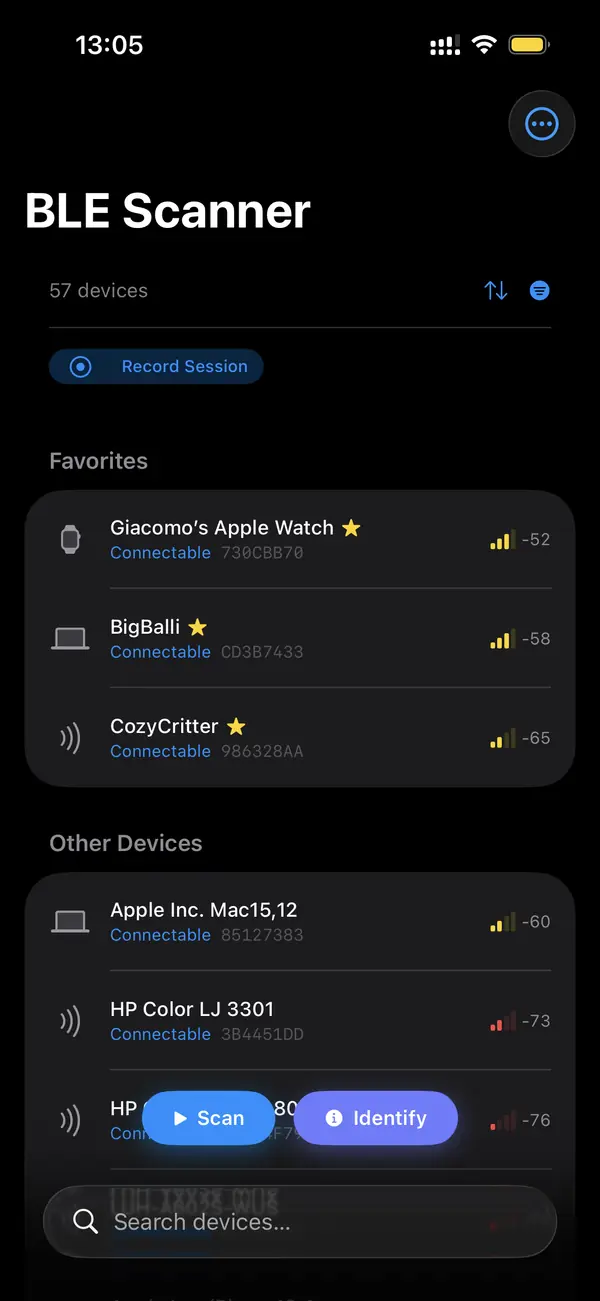
Unwanted tracking happens when someone slips an AirTag or similar tag into your bag, car, or coat. Built-in alerts from Apple and the tracker industry help, but they can be slow and do not catch every device. A BLE scanner gives you an independent, on-demand check: see every tracker-class beacon around you and spot the one that will not leave.
How do you tell a stalking tracker from background noise?
The signature of an unwanted tracker is persistence across locations. A scanner shows dozens of beacons at any moment, but most belong to the place: a neighbor's tag, a store's beacon. A tracker following you reappears in unrelated locations and its signal stays strong as you move. Persistence plus mobility, not a single sighting, is the red flag.
Run a scan at home and note the tracker-class devices. Run another in your car and a third at work. Cross off anything that only showed up once. A tag that appears in all three, with steady or rising signal, is traveling with you. That pattern is what separates a planted tracker from the ambient beacons in any environment.
Why aren't built-in alerts enough?
Apple's unwanted-tracking alerts and the cross-industry standard help, but they trigger on a delay, require specific conditions, and do not cover every tracker brand. Some tags rotate identifiers or run in modes that suppress alerts. A manual scan with a BLE tool fills the gap by letting you look right now, on your terms, instead of waiting for an automated warning.
Apple and Google co-authored a detecting-unwanted-location-trackers specification so phones warn users about tags traveling with them. It is a real improvement, but coverage depends on the tag implementing the standard and on timing windows. A scanner does not wait: you choose when to check, and you see the raw beacons rather than a filtered subset.
What types of trackers can a scanner flag?
A privacy analyzer flags AirTags broadcasting Find My beacons, Tile tags by their service UUID, and generic tracker-class devices by their advertising signature. It cannot name the owner, which is protected, but it tells you the class of device and its live signal so you can confirm whether it is following you and then locate it physically.
AirTags advertise Apple's Find My payload, especially in a separated or lost state. Tile and other brands broadcast recognizable service UUIDs. Cheaper no-name tags still show a tracker-like advertising pattern. The analyzer groups these so you are not hunting through a raw list trying to guess which anonymous beacon is a tracker.
What should you do after you find one?
Once you confirm a tracker is following you, use proximity mode to locate it physically by signal. Do not destroy it before documenting it. If you feel unsafe, contact local law enforcement, who can work with the manufacturer to identify the owner through the device serial. Your safety comes first; treat a confirmed planted tracker as a personal-safety matter.
An AirTag's serial can help authorities request owner information from Apple through proper legal channels. Photograph the device and where you found it. If you are in immediate danger, prioritize getting to a safe place over investigating. The scanner's job is to confirm and locate; resolving who placed it is a matter for the police.
Key takeaways
- The signature of an unwanted tracker is persistence across multiple locations.
- Scan at home, in your car, and at work; the tag in all three is following you.
- Built-in alerts are delayed and not universal, so a manual scan fills the gap.
- A privacy analyzer flags AirTags, Tiles, and generic tracker-class beacons.
- If you confirm one, locate it by signal, document it, and contact authorities if unsafe.
Frequently asked questions
- Can a BLE scanner detect any AirTag near me?
- It can detect AirTags that are actively advertising, which includes ones separated from their owner and broadcasting on the Find My network. The scanner shows the beacon and its signal strength. It cannot reveal who owns the AirTag, since that identity is protected, but it confirms presence and helps you locate the device.
- Will the person who planted the tracker know I scanned?
- No. Scanning is passive; your phone only listens to public advertising packets and transmits nothing to the tracker or its owner. The act of scanning leaves no trace on the tag. This is different from the official Find My flow, which may notify an owner under certain conditions; a raw scan does not.
- What if the tracker keeps changing its identifier?
- Many trackers rotate identifiers for privacy, which can make a single device look like several. Focus on behavior rather than the changing label: a tracker-class beacon that consistently travels with you across locations is the concern, even if its advertised identifier rotates between scans. The follow-along pattern is what matters.
- Are cheap no-name trackers detectable too?
- Usually yes. Even budget tags broadcast BLE advertising packets with a tracker-like signature, so a scanner can surface them alongside AirTags and Tiles. They may lack a recognizable brand UUID, but their persistent advertising and follow-along behavior still flag them. Treat any beacon that shadows you across locations as worth investigating.
Bluetooth & IoT Tooling, BigBalli. We build iOS tools for inspecting Bluetooth Low Energy and write guides cross-checked against the Bluetooth SIG specifications and Apple's Core Bluetooth documentation.
BLE Scanner is a diagnostic tool, not a security guarantee. If you believe you are being tracked or are in danger, contact local law enforcement. A scanner can confirm and locate a device but cannot identify its owner.