How Do You Find a Lost AirTag or Tile With a BLE Scanner?
A BLE tag broadcasts advertising packets constantly, which means any scanner can hear it even when the official app gives up. Find My works best for your own AirTags, and Tile rings its own tags, but both struggle with a dead speaker, a separated tag, or a tag registered to someone else. A raw RSSI hunt does not care who owns the tag.
How does proximity finding actually work?
Proximity finding reads the tag's RSSI in real time and translates rising strength into getting warmer. As you walk toward the tag the averaged RSSI climbs toward zero; as you move away it falls. By sweeping a room and watching the trend, you triangulate the tag's location without needing the manufacturer's ringing feature at all.
The method is the radio version of a children's hotter-colder game. Hold the phone out, move slowly, and let the average settle between steps because a single packet is noisy. When the value peaks from several directions, the tag is within a meter or two. Reflections off metal can create false peaks, so confirm from more than one approach.
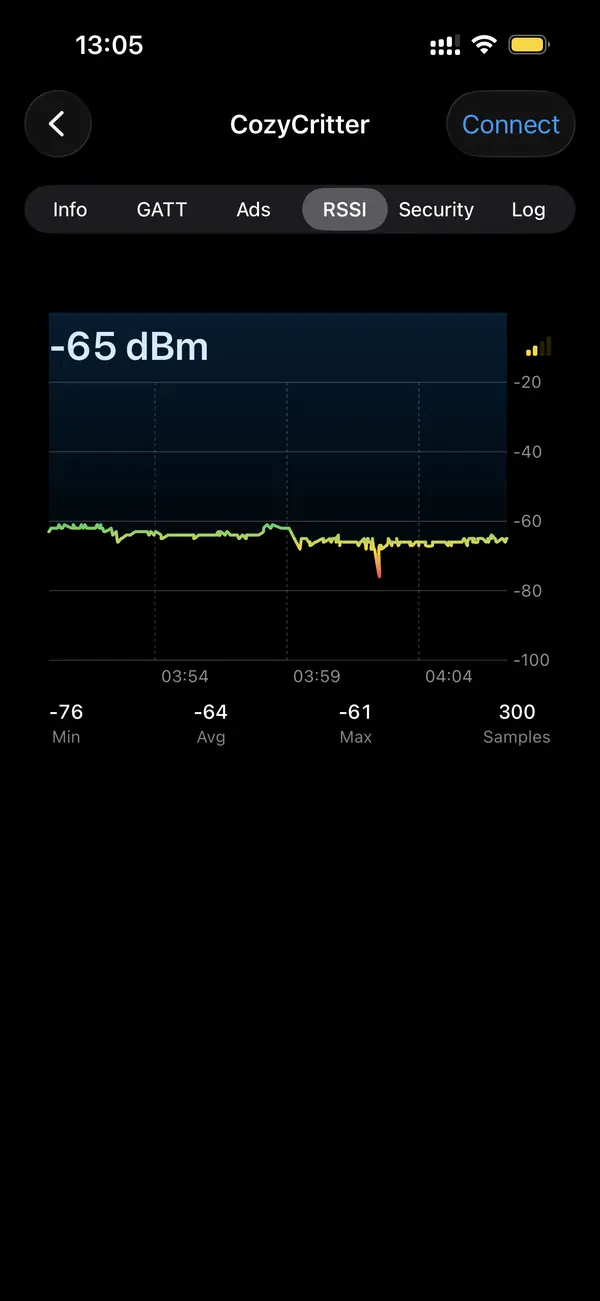
Can you find a tag when its speaker is dead?
Yes. A dead or muted speaker stops the tag from ringing, but the BLE radio keeps advertising as long as the battery has charge. A scanner hears those packets and shows RSSI, so you can locate the tag by signal alone. This is the main advantage over the official apps, which lean on sound to guide you the final few feet.
Silent tags are common: the speaker fails, someone disables the chime, or firmware mutes it to save power. None of that affects the advertising broadcast. The scanner treats a silent AirTag the same as a loud one, because it is reading the radio, not listening for a tone. As long as the coin cell has life, the signal is there.
What can you identify about the tag?
A scanner reads the tag's advertising payload, which for an AirTag is an Apple Find My beacon, and for a Tile is Tile's service UUID. You see the device class, signal strength, and whether it is in a lost or nearby state. iOS shows a rotating identifier rather than a permanent MAC, so the label changes over time by design.
AirTags use Apple's Find My network and rotate their advertised identity for privacy, so you track the live signal in the moment rather than a fixed address. Tile broadcasts a recognizable service UUID that a continuity-aware scanner labels directly. Either way you get enough to confirm you are chasing the right class of device before you start the proximity sweep.
What if the tag belongs to someone else?
If you find a tracker you do not own following you, that is a safety concern, not a lost-item search. A scanner can confirm whether a tracker-class device is persistently near you across locations. For locating your own misplaced gear the proximity method is ideal; for an unknown tracker that travels with you, treat it as a privacy issue and act accordingly.
Apple and the tracking industry added unwanted-tracking alerts, but they are not instant and not universal. A scanner gives you an independent check: see the device, watch whether it persists as you move between places, and locate it physically. Our separate guide on detecting unwanted trackers covers the steps once you confirm one is shadowing you.
Key takeaways
- BLE tags advertise constantly, so a scanner can find them even when official apps fail.
- Proximity finding uses rising RSSI to guide you hotter and colder toward the tag.
- A dead or muted speaker does not stop the radio, so signal-based finding still works.
- Move slowly and use the averaged RSSI; single packets are too noisy to trust.
- A tracker that follows you across locations is a privacy concern, not a lost item.
Frequently asked questions
- Can a BLE scanner find an AirTag that is not mine?
- A scanner can detect any AirTag advertising nearby, including ones you do not own, and show its live signal strength so you can locate it physically. It cannot reveal the owner's identity, which is protected. This is useful both for returning a found AirTag and for checking whether an unknown tracker is following you.
- Why does the tag's identifier keep changing?
- AirTags and many modern trackers rotate their advertised identifier on a schedule to prevent long-term tracking by address. iOS also hands apps a randomized UUID rather than the hardware MAC. You locate the tag by following its live signal in the moment rather than by a fixed, permanent identifier.
- How close can RSSI get me to the tag?
- RSSI reliably narrows a search to within a meter or two, enough to find a tag in a couch cushion or a bag. The final few inches are harder because reflections distort the signal at very close range. Sweeping the area from several angles and watching the peak usually pinpoints it.
- Does the tag need to be paired to my phone?
- No. Proximity finding reads public advertising packets, so the tag does not need to be paired or owned by you. The scanner simply listens for the broadcast and reports its strength. This is why it works for separated AirTags, other people's lost tags, and any BLE beacon in range.
Bluetooth & IoT Tooling, BigBalli. We build iOS tools for inspecting Bluetooth Low Energy and write guides cross-checked against the Bluetooth SIG specifications and Apple's Core Bluetooth documentation.
BLE Scanner is an engineering and diagnostic tool. Use proximity finding to locate your own property. If you suspect an unwanted tracker is following you, treat it as a safety matter and contact local authorities where appropriate.