How Do You Scan for Bluetooth LE Devices on iPhone?
iOS will not show you raw Bluetooth Low Energy traffic from Settings. The system Bluetooth screen lists audio gear and classic accessories you have paired, not the dozens of BLE devices advertising around you right now. A scanner app uses Core Bluetooth to listen for those advertising packets and lists every device it hears, named or not.
Why can't iPhone Settings show BLE devices?
The iOS Settings Bluetooth panel is built for pairing audio and HID accessories over Bluetooth Classic. It does not surface BLE advertising packets, which are how sensors, beacons, and trackers announce themselves. To see those you need an app that calls Core Bluetooth and subscribes to scan results, which is exactly what BLE Scanner does.
BLE devices broadcast small advertising packets a few times per second. Settings ignores anything you have not deliberately paired, so a heart rate strap, a smart bulb, or a nearby AirTag never appears there. Apple exposes scanning only through the Core Bluetooth framework, so any tool that lists live BLE devices is an app sitting on top of that API.
How do you start a BLE scan on iPhone?
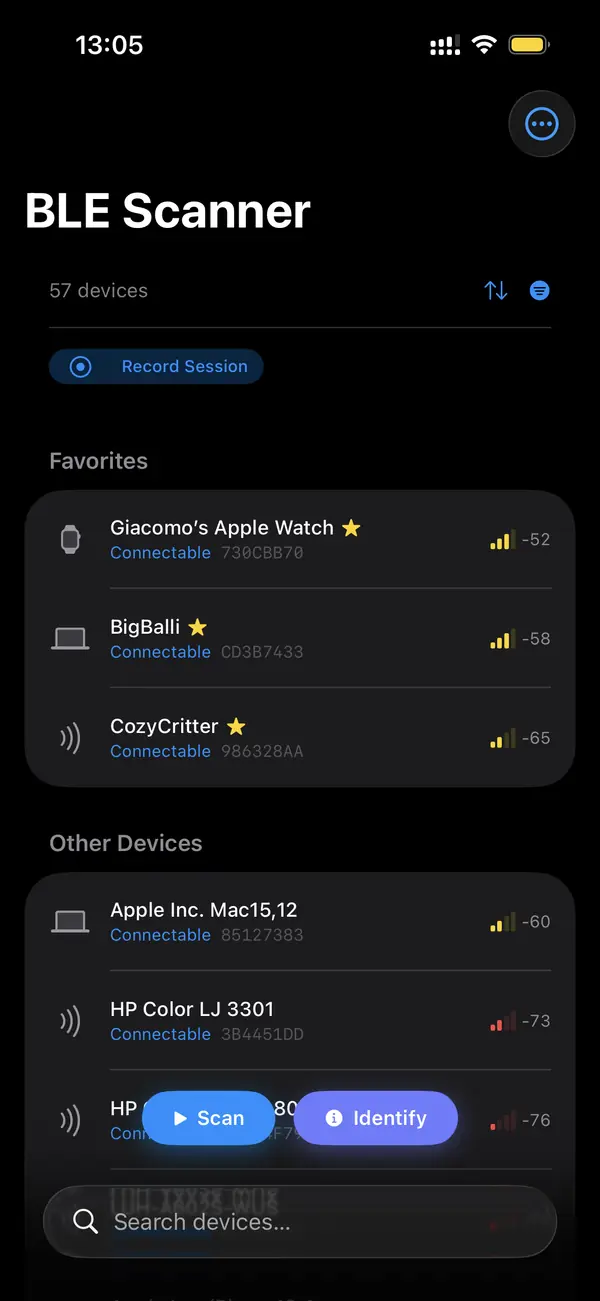
Install a BLE scanner, open it, and tap Allow when iOS asks for Bluetooth access. Scanning starts automatically and devices stream in within a second or two. Each row shows the advertised name or a fallback identifier, live RSSI, and any service UUIDs the device broadcasts. Pull to refresh or use filters to narrow a crowded list.
The first run prompts for the Bluetooth permission that Core Bluetooth requires. Grant it once and the app remembers. From there scanning is passive: you are reading public advertising packets, not connecting yet. In a typical home or office you will see ten to fifty devices, from earbuds and watches to thermostats and fitness sensors.
What information shows up for each device?
Each scan result includes the advertised local name, signal strength in dBm, advertised service UUIDs, manufacturer data, and a stable per-session identifier. iOS gives apps a randomized UUID rather than the hardware MAC address, so the identifier you see is generated by Core Bluetooth, not the device's real Bluetooth address.
Manufacturer data is the richest field. Apple Continuity packets, iBeacon frames, and Eddystone broadcasts all live there, and a good scanner parses them into readable values. Service UUIDs hint at what the device does before you ever connect: 0x180D means heart rate, 0x180F means battery service, 0x1812 means HID over GATT.
How do you connect to a device you find?
Tap a device in the scan list to initiate a connection over GATT. Once connected, the app discovers the full service tree and shows characteristics you can read, write, or subscribe to. Connection only works for devices that accept it; beacons and many trackers advertise only and reject connection attempts by design.
A successful connect pauses advertising for that device and opens its GATT database. From there you inspect services and characteristics, read a battery level, or subscribe to notifications like heart rate updates. If a device refuses to connect it is usually advertise-only or already bonded to another phone.
Key takeaways
- iOS Settings shows paired classic accessories, not live BLE advertising, so you need a scanner app.
- BLE Scanner uses Core Bluetooth to list nearby devices with name, RSSI, and service UUIDs in seconds.
- Grant the Bluetooth permission once on first launch and scanning starts automatically.
- iOS gives apps a randomized identifier, not the hardware MAC address.
- Tap a connectable device to open its GATT tree; beacons and many trackers are advertise-only.
Frequently asked questions
- Do I need to jailbreak my iPhone to scan BLE?
- No. Scanning for BLE devices is a standard capability of the Core Bluetooth framework that Apple provides to every app. A BLE scanner app reads public advertising packets with your permission. No jailbreak, profile, or developer account is required, and the App Store distributes these tools normally.
- Why do some devices show no name?
- Many BLE devices omit a local name from their advertising packet to save space or for privacy. They still broadcast service UUIDs and manufacturer data, so the scanner shows those instead. Connecting to the device often reveals a Device Name characteristic in the Generic Access service that fills in the missing label.
- Does BLE scanning drain my battery fast?
- Passive scanning is light on power because the radio is only listening, not transmitting. Continuous foreground scanning uses more than an idle phone, but far less than streaming audio or video. Closing the app or stopping the scan returns the Bluetooth radio to its normal low-power advertising-listen cycle.
- Can I scan BLE on iPad too?
- Yes. Any iPhone or iPad with Bluetooth Low Energy hardware, which means essentially every model since the iPhone 4S, can run a Core Bluetooth scanner. The same app and the same workflow apply. iPadOS uses the identical framework, so device discovery, GATT inspection, and RSSI charts all work the same way.
Bluetooth & IoT Tooling, BigBalli. We build iOS tools for inspecting Bluetooth Low Energy and write guides cross-checked against the Bluetooth SIG specifications and Apple's Core Bluetooth documentation.
BLE Scanner is an engineering and diagnostic tool. Inspect only devices you own or are authorized to test. Bluetooth and GATT behavior varies by device firmware; always confirm against the manufacturer's documentation before relying on a reading.