What Are GATT Services and Characteristics in BLE?
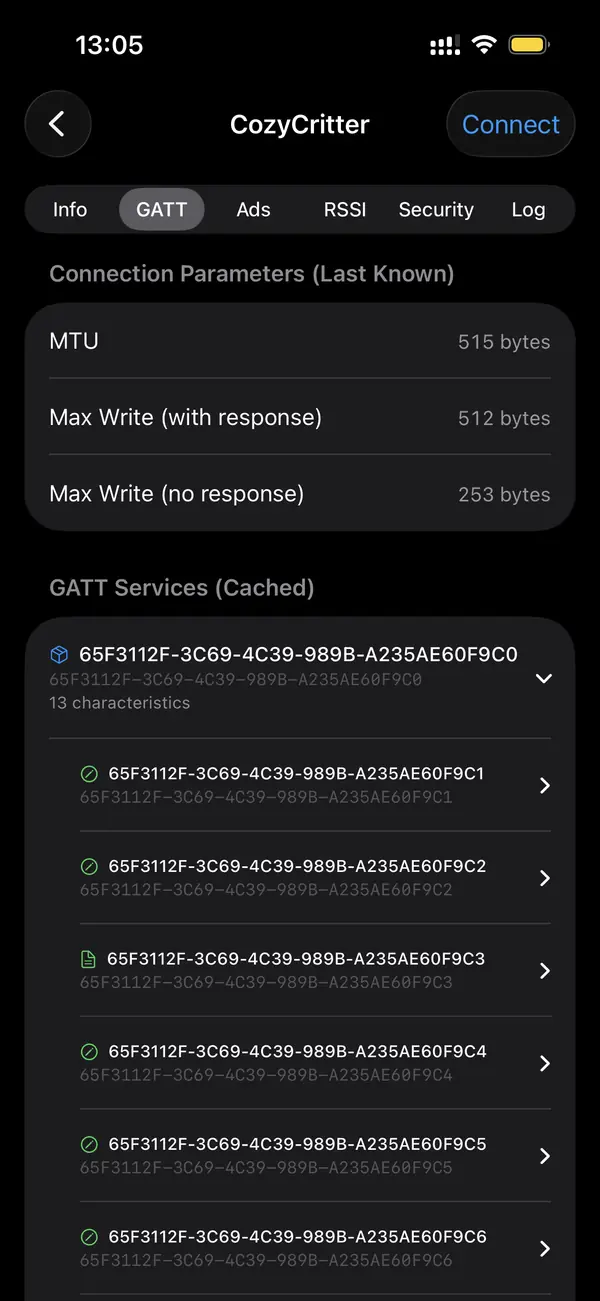
Once you connect to a Bluetooth Low Energy device, everything it lets you touch is organized as GATT. Think of it as a small database the device publishes. Services group related features, characteristics are the individual data points, and descriptors add metadata. A scanner that shows the full tree lets you see exactly what a device can do.
What is a GATT service?
A service is a named container that groups related characteristics. The Bluetooth SIG defines standard services with fixed 16-bit UUIDs, such as 0x180F for Battery Service and 0x180D for Heart Rate. Vendors also define custom services with 128-bit UUIDs. Discovering services is the first step after connecting, before you read any actual values.
Each service answers a question about the device. Does it report battery? Look for 0x180F. Is it a fitness sensor? Heart Rate is 0x180D and Cycling Speed is 0x1816. Custom firmware uses long random UUIDs that a scanner cannot name, which is the signal that you are looking at vendor-specific functionality rather than a standard profile.
What is a characteristic?
A characteristic is a single data point inside a service: a value plus a set of properties. The value is the bytes you read or write, like a battery percentage or a command. Properties declare what you can do: Read returns the current value, Write sends new bytes, and Notify or Indicate push updates to you without polling.
Battery Level inside Battery Service is read-only and returns one byte, 0 to 100. A heart rate measurement supports Notify, so you subscribe once and the device streams beats as they happen. A control point characteristic is usually write-only and rejects reads. The property flags tell you the rules before you try an operation.
What do descriptors do?
Descriptors are metadata attached to a characteristic. The most important is the Client Characteristic Configuration Descriptor, the CCCD with UUID 0x2902. Writing to it is how you turn notifications on or off. Other descriptors carry human-readable labels or value formats, such as the unit and exponent for a numeric reading.
If you want live updates and nothing arrives, the CCCD is usually the reason. Subscribing means writing 0x0001 to that descriptor to enable notifications, or 0x0002 for indications. A good scanner handles this automatically when you tap subscribe, so you rarely write the CCCD by hand, but knowing it exists explains why a stream starts or stays silent.
How are standard and custom UUIDs different?
Standard Bluetooth UUIDs are 16 bits, assigned by the Bluetooth SIG, and a scanner can name them. Custom UUIDs are full 128-bit values chosen by a vendor for proprietary features. Seeing a long unnamed UUID means the device exposes firmware-specific functionality that you decode from the vendor's documentation, not the public assigned-numbers list.
The SIG maintains an assigned-numbers registry that maps short UUIDs to names. Tools expand a 16-bit UUID like 0x180F into Battery Service automatically. A 128-bit UUID such as 6e400001-b5a3-f393-e0a9-e50e24dcca9e is Nordic's UART service, a common pattern in dev boards. When a UUID is unnamed, the firmware vendor defines its meaning.
Key takeaways
- GATT organizes a connected device as services, characteristics, and descriptors.
- Services group features; standard ones use 16-bit UUIDs the scanner can name.
- Characteristics hold a value plus properties: read, write, notify, indicate.
- The CCCD descriptor (0x2902) turns notifications on and off.
- Long 128-bit UUIDs are vendor-specific and decoded from firmware documentation.
Frequently asked questions
- Does every BLE device use GATT?
- Every connectable BLE device exposes data through GATT once you connect. Advertise-only devices like beacons and many trackers never accept a connection, so they have no browsable GATT tree; they only broadcast advertising packets. If a device lets you connect, it presents a GATT database of services and characteristics.
- What is the difference between Notify and Indicate?
- Both push values to you without polling. Notify is fire-and-forget and faster, used for high-rate data like heart rate. Indicate requires the client to acknowledge each packet, making it slower but reliable, used where a missed update matters. You enable either by writing to the characteristic's CCCD descriptor.
- Why can I see a characteristic but not read it?
- The characteristic's properties may not include Read, or it may require an encrypted, bonded connection. Control-point characteristics are often write-only by design. If a read returns an error, check the property flags first, then whether the device demands pairing before it releases the value.
- Can I change a device's behavior by writing to GATT?
- Yes, for characteristics that support Write. Many devices expose a control point where a specific byte sequence triggers an action, such as starting a measurement or setting a configuration. Writing the wrong bytes can misconfigure firmware, so only write values you understand from the device's documentation.
Bluetooth & IoT Tooling, BigBalli. We build iOS tools for inspecting Bluetooth Low Energy and write guides cross-checked against the Bluetooth SIG specifications and Apple's Core Bluetooth documentation.
BLE Scanner is an engineering and diagnostic tool. Inspect only devices you own or are authorized to test. GATT behavior varies by firmware; confirm UUIDs and value formats against the manufacturer's documentation before relying on a reading.