Why Can't You See a Bluetooth Device's MAC Address on iPhone?
People moving from Android or desktop tools expect a Bluetooth MAC address in every scan. On iPhone it is missing, and that surprises new BLE developers. The reason is not a limitation in the scanner. Apple decided that exposing hardware addresses enables tracking, so Core Bluetooth substitutes a generated identifier and keeps the real MAC out of reach for every app on the platform.
Why does iOS hide the MAC address?
A static MAC address is a permanent fingerprint that lets anyone follow a device across time and place. To stop that, Apple never exposes the hardware address through Core Bluetooth. Instead each peripheral gets a randomized UUID, unique to your phone and the app, so the same device looks different to different apps and cannot be tracked by address.
The privacy logic is the same reason iOS and modern Android randomize Wi-Fi and Bluetooth addresses generally. If apps could read a fixed MAC, advertisers and trackers would correlate your devices everywhere they appear. By generating a per-app identifier, Apple breaks that linkage. The trade-off is that cross-tool MAC matching, common on desktop, simply does not work on iPhone.
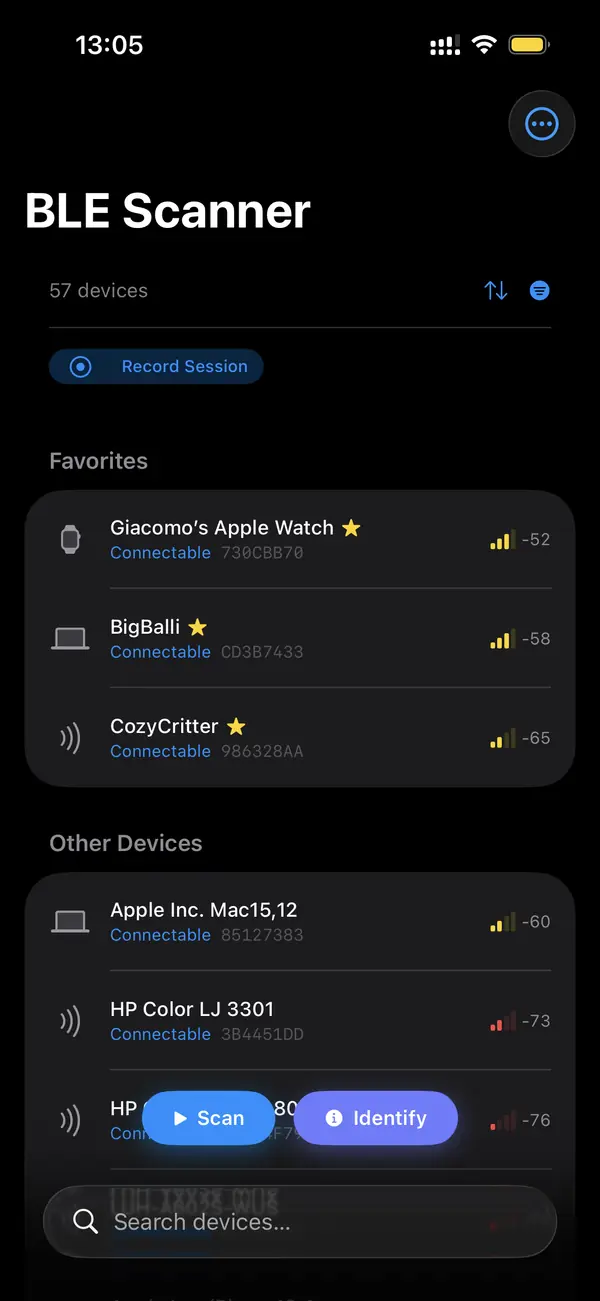
What identifier does iOS give instead?
Core Bluetooth assigns each peripheral a CBPeripheral identifier, a 128-bit UUID that is stable for your phone and app combination but means nothing to other devices. Reconnect later and the same physical device usually keeps the same UUID on your phone, which is enough for reconnection, but you cannot share it as a universal address the way a MAC works.
This UUID lets your own app remember a device between sessions and reconnect without rescanning. What it does not do is travel: another phone, or even another app on the same phone, sees a different UUID for the same hardware. So it solves reconnection while preventing the cross-device tracking a real MAC would enable.
How do you identify a device without its MAC?
Identify devices by their advertised local name, the service UUIDs they broadcast, and their manufacturer data. A heart rate strap announces service 0x180D; an Apple device emits a recognizable Continuity payload. These fields, combined with signal strength and behavior over time, let you tell devices apart reliably without ever needing the hardware address.
Manufacturer data is the richest fingerprint available. It carries iBeacon identifiers, Eddystone frames, and vendor-specific bytes that distinguish one model from another. Pair that with the advertised name and service list and you can label most devices confidently. For your own gear, the per-app UUID handles reconnection, so the missing MAC rarely blocks real work.
Is there any way to get the real MAC?
Not through a normal iOS app. Some devices place their MAC inside an advertising or GATT field you can read, and many trackers rotate their address anyway, so even a captured value may not be permanent. Apart from those device-specific cases, the hardware Bluetooth address is unavailable to App Store apps by Apple's design.
If a device deliberately publishes its MAC in a characteristic or in its advertising payload, a scanner can show that value because the device chose to share it. Resolvable private addresses, used by privacy-aware devices, rotate on a timer, so what you capture is temporary. For anything not self-published, there is no supported path to the real address on iPhone.
Key takeaways
- iOS never exposes a device's hardware Bluetooth MAC address to apps.
- Core Bluetooth gives a per-app randomized UUID instead, to prevent tracking.
- That UUID is stable for your phone and app, so reconnection still works.
- Identify devices by name, service UUIDs, and manufacturer data.
- You can only see a MAC if the device deliberately publishes it, and it may rotate.
Frequently asked questions
- Does Android show the Bluetooth MAC when iOS does not?
- Android historically exposed more address information to apps, though recent versions also randomize and restrict it for privacy. iOS has always withheld the hardware MAC through Core Bluetooth. If you are porting a tool from Android, expect to identify devices by name, services, and manufacturer data on iPhone rather than by address.
- Will the per-app UUID stay the same forever?
- It is stable for a given device on a given phone and app, and usually persists across reconnections, which is what lets your app remember a device. It can change if the device or the app's stored state is reset. It is not a permanent universal identifier and cannot be matched across other phones or apps.
- Can two scanner apps share a device identifier?
- No. Core Bluetooth generates the peripheral UUID per app, so the same physical device shows a different identifier in each app. There is no supported way to correlate a device between two apps by identifier on iOS. This separation is intentional and is part of how Apple prevents cross-app tracking.
- Why do some trackers rotate their address?
- Privacy-aware BLE devices use resolvable private addresses that change on a timer so they cannot be followed by a fixed value. AirTags and similar trackers do this deliberately. Even on a platform that exposed the address, a captured value would expire, which is why behavior and signal matter more than any single address.
Bluetooth & IoT Tooling, BigBalli. We build iOS tools for inspecting Bluetooth Low Energy and write guides cross-checked against the Bluetooth SIG specifications and Apple's Core Bluetooth documentation.
BLE Scanner is an engineering and diagnostic tool. iOS withholds hardware Bluetooth addresses by design; this is platform behavior, not a fault in any scanner. Inspect only devices you own or are authorized to test.