How Do You Create Custom Contact Groups on iPhone?
Most people expect a New Group button in Contacts and never find one. iOS shows groups and lets you filter by them, but creating and editing them is pushed to iCloud.com or a third-party app. Once you have groups, everything downstream gets faster: targeted exports, group messages, and mailing labels for just the right people.
Why can't you create groups in the iPhone Contacts app?
Apple built group viewing into iOS but left group creation out of the Contacts app. You can tap Lists or Groups to filter, yet there is no option to make a new one on the phone. To create groups natively you sign into iCloud.com on a computer, or you use an app that manages groups directly on the device.
This gap surprises people moving from Android or Outlook, where group creation is built in. The workaround on iCloud.com works but means leaving the phone. An app keeps the whole task on iOS, which matters when you are organizing contacts for a quick export or a message you want to send now.
How do you make a group on iCloud.com?
On a computer, sign in at icloud.com, open Contacts, and click the plus button to add a New Group. Name it, then drag contacts into it from the main list. The group syncs back to your iPhone, where it appears under Lists. This works but requires a computer and some back-and-forth dragging for larger groups.
For a one-off group this is fine. It becomes tedious when you are building several groups or adding many people, because dragging contacts one at a time on the web is slow. That friction is why many people prefer to create and fill groups on the phone itself.
How do you build groups on the iPhone directly?
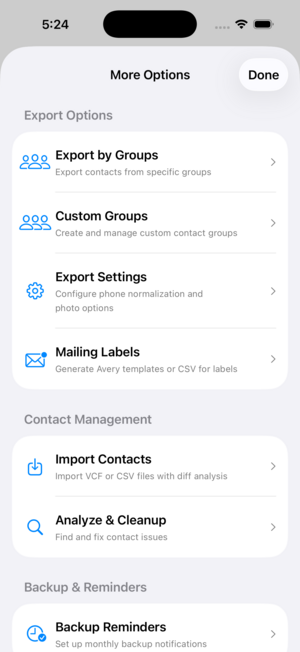
Open Contact Exporter, create a group such as Clients or Holiday Cards, and add contacts to it from your address book. The group lives in the app for organizing, exporting and printing, so you can build lists without cluttering or altering your iPhone Contacts. Add or remove people any time, then export or label that group on its own.
Keeping working groups in the app means your main Contacts stays clean while you still get the benefit of organized lists. When you need to send a group export to a colleague or print labels for a mailing, you select the group and go, no scrolling and no manual reselection each time.
What can you do once contacts are grouped?
Groups turn whole-book tasks into targeted ones. Export only your Clients to a CSV for a CRM, print mailing labels for just the Holiday Cards group, or email a project team without retyping addresses. A group is reusable, so the work of organizing once pays off every time you export, message or print to that list.
Groups also make cleanup easier. Reviewing one group at a time is less daunting than the full address book, and it surfaces stragglers, like a client missing an email, that you would miss scrolling everything. Organized lists are the foundation for fast exports and clean mailings.
Key takeaways
- iOS Contacts shows groups but cannot create them.
- iCloud.com can make groups, but it needs a computer and manual dragging.
- Contact Exporter builds and fills custom groups on the iPhone.
- Groups keep your main Contacts clean while organizing working lists.
- A group makes targeted export, messaging and label printing fast.
Frequently asked questions
- Does making a group change my actual contacts?
- No. A group is a label that points at existing contacts; it does not duplicate or edit the underlying cards. Building groups in Contact Exporter organizes them for export and printing without altering your iPhone Contacts. Remove a contact from a group and the contact itself stays untouched in your address book.
- Can I text or email a whole group at once?
- Once contacts are grouped, you can pull the group's addresses into a message rather than picking people one by one. The group acts as a reusable recipient list. This is the main reason people build groups: sending to a project team or a family list becomes a quick selection instead of a manual hunt.
- Why don't my iCloud groups show on my iPhone?
- If groups created on iCloud.com are not visible, check that Contacts is enabled for iCloud in iOS Settings and give it a minute to sync. Tap Lists or Groups at the top of the Contacts app to reveal them. A sync delay or a disabled iCloud Contacts toggle is the usual reason groups appear on the web but not the phone.
- Can I export just one group instead of all contacts?
- Yes, and that is one of the main benefits. In Contact Exporter you select a single group and export only those contacts to CSV, XLSX or VCF. This keeps a CRM import or a mailing focused on the right people, instead of exporting your entire address book and filtering it down afterward.
iOS Contact Data & Migration, BigBalli. We build tools that organize, export and print from address books, and we cross-check our guides against Apple documentation.
Contact Exporter is an independent iOS utility and is not affiliated with Apple. Steps reflect current iOS and iCloud behavior and may change with future updates.