How Do You Remove Duplicate Contacts on iPhone?
Duplicate contacts pile up from syncing the same account twice, importing a CSV on top of existing cards, or saving someone once by name and once by number. The result is double texts and missed calls. iOS catches exact matches; the stubborn ones are the slight variations, and those need a real cleanup pass.
How does the iPhone find duplicate contacts?
In the Contacts app, a Duplicates banner appears at the top of the list when iOS detects exact or very close matches. Tap it to review and merge. This catches identical cards but often misses a contact saved as Mike versus Michael, or the same person under two phone numbers, because the app compares fields strictly.
The built-in tool is a good first sweep. Run it before anything else to clear the easy wins. What it leaves behind are the fuzzy duplicates, the ones where a name, number or email differs by a character or a format, and those are where a dedicated analysis tool earns its place.
Why does the iPhone miss some duplicates?
iOS compares contacts strictly, so small differences hide a match. A number stored as 415-555-0123 on one card and +14155550123 on another reads as two people. A nickname, a maiden name, or a typo in an email all defeat the exact-match logic. These near-duplicates are the ones that survive the built-in merge and keep cluttering your list.
Format inconsistency is the biggest culprit. The same phone number written four ways looks like four contacts. Normalizing numbers to a single format, such as E.164, collapses those variations so the duplicate becomes obvious. That normalization is something an export-and-clean workflow does that the native merge does not.
How do you clean duplicates in one pass?
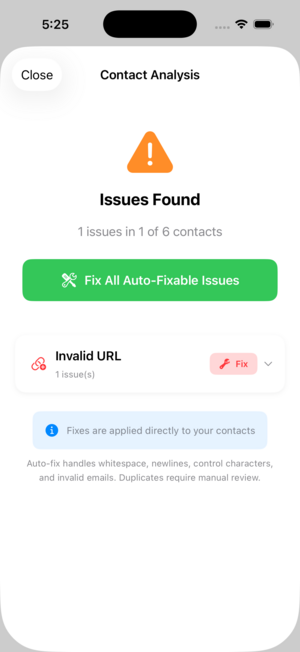
Export the address book and run an analysis that lists duplicates, near-matches, broken emails, invalid URLs and empty cards together. Review them in one place, decide what merges and what gets deleted, then apply the fixes and re-import a clean list. Contact Exporter surfaces all these problems at once so you are not hunting card by card.
Working from one review screen is far faster than scrolling the Contacts app. You see patterns, like a whole batch of cards missing last names from a bad import, and fix them as a group. Then a single clean file goes back to the phone, and the duplicates do not come back.
How do you stop duplicates from coming back?
Duplicates return when you sync the same account in two places or import a file on top of existing contacts. Keep contacts in one account, not iCloud and Gmail both writing to the phone. Before any import, dedupe the file first. A monthly cleanup catches new duplicates early, before they multiply through another round of syncing.
Standardize how you save numbers, too. If every number goes in as +country code and digits, future imports match cleanly instead of spawning variants. A little discipline at entry time, plus a periodic export-and-review, keeps the address book tidy long term.
Key takeaways
- iOS merges exact duplicates but misses nicknames and format variants.
- Inconsistent phone number formats are the top cause of hidden duplicates.
- Exporting lets you review all duplicates and broken fields in one view.
- Contact Exporter flags duplicates, bad emails and empty cards together.
- Dedupe import files and keep one account to stop duplicates returning.
Frequently asked questions
- Does merging contacts delete any information?
- A proper merge combines the fields from both cards into one, so a phone number on one and an email on the other both survive. It only removes the redundant second card. To be safe, export a backup before a large cleanup so you can restore the original list if a merge combines two people who were not actually the same.
- Why do I have duplicate contacts after switching phones?
- Migrations often import the same contacts twice, once from iCloud and once from a transferred file or a second account. The two sources rarely match exactly, so the phone keeps both. Cleaning the export before importing, and keeping contacts in a single account afterward, prevents most of these migration duplicates from appearing in the first place.
- Can I merge contacts that have slightly different names?
- The iPhone usually will not, because its matching is strict. An export-and-analyze workflow can group near-matches like Mike and Michael Smith so you decide whether they are the same person. You merge the ones that match and keep the rest separate, then re-import a clean list with the real duplicates resolved.
- Will cleaning duplicates affect my iCloud contacts?
- If contacts sync with iCloud, any merge or delete you apply replicates to your other devices. That is why a backup first matters. Export a dated file before cleaning, make your changes, and confirm the result looks right. The backup means an over-eager merge is recoverable instead of permanent across every synced device.
iOS Contact Data & Migration, BigBalli. We build tools that clean and move address books across phones, spreadsheets and CRMs, and we cross-check our guides against Apple and Google documentation.
Contact Exporter is an independent iOS utility and is not affiliated with Apple or Google. Export a backup before a large cleanup. Steps reflect current iOS behavior and may change with future updates.