What Happened to US Cellular's My Contacts Backup on iPhone?
If your contacts live only in a carrier backup, they live on a server owned by a company that no longer exists in its old form. UScellular's retail wireless business now belongs to T-Mobile, and the UScellular website forwards every page, support included, to T-Mobile. Contacts stored in iCloud, Google or on the iPhone do not depend on the carrier at all. The fix is to move them there and keep a file of your own.
Does US Cellular's My Contacts Backup still work?
There is no published shutdown date and no published migration path for UScellular's My Contacts Backup. T-Mobile closed its purchase of UScellular's wireless operations on August 1, 2025. On October 9, 2026, uscellular.com and its support pages returned a permanent redirect to t-mobile.com, and the Asurion-built Android app's Google Play listing returned "not found."
The T-Mobile announcement says the deal covers more than four million UScellular customers, including businesses. T-Mobile's UScellular business page says that, as of May 1, adding a line, upgrading a device or changing a plan must happen under the T-Mobile brand. Carrier-side extras are the services most likely to disappear in a move like this. Treat any contacts that exist only in My Contacts Backup as at risk, and copy them out while you still can.
Which My Contacts Backup app is on your iPhone?
Three different products answer to "My Contacts Backup" on a UScellular iPhone. UScellular's original service was built by Asurion. UScellular Protect, sold by USCC Services, LLC and copyrighted by Assurant, still lists contact backup on the App Store. An unrelated App Store app named My Contacts Backup comes from Globile and has nothing to do with the carrier.
| App | Publisher | What it does with contacts |
|---|---|---|
| My Contacts Backup (UScellular) | Asurion, for UScellular | Kept a copy on the carrier's servers. Android listing removed from Google Play. |
| UScellular Protect | USCC Services, LLC (Assurant) | "Back up and restore your photos, videos, music, and contacts," per its App Store listing, alongside device protection claims. |
| My Contacts Backup | Globile | Emails you a VCF file. The free version stops at 500 contacts. |
Open the App Store page of the app on your phone and read the developer line under its name. If it says Globile, your backups are VCF files in your own email, not on any UScellular server, and the T-Mobile move does not affect them.
How do you move contacts off a carrier backup?
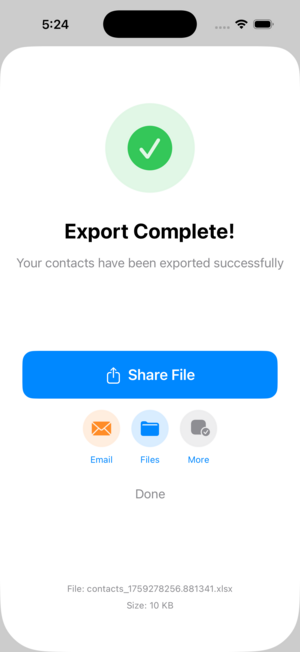
Restore the contacts from the carrier app to the iPhone first, while the app still signs in. Then turn on Contacts in iCloud under Settings, your name, iCloud, and choose Merge so the phone's contacts upload. Finally export the whole address book to a VCF file with Contact Exporter and store that file off the phone.
Apple's iCloud Contacts guide explains the switch: on iOS 16 or later, tap Show All under Saved to iCloud before you find Contacts. If you use Gmail on the phone, Google can hold the contacts instead, and our guide to moving iPhone contacts to Google covers the import. If the carrier app no longer signs in, call T-Mobile care at 611 before your account moves to T-Mobile billing and ask whether the backup can still be reached.
How does Contact Exporter back up iPhone contacts?
Contact Exporter reads the iPhone address book and writes it to a VCF, CSV, TXT or Excel file on the device, contact photos included. You save the file to Files, iCloud Drive, a computer or email, and it stays yours whichever carrier you use. A monthly reminder prompts a fresh, dated copy before the old one goes stale.
VCF is the format to keep for restoring, because the iPhone Contacts app and iCloud.com both import it directly. Excel or CSV is the format to keep for reading, so you can check what a backup holds without restoring anything. Our guide to backing up iPhone contacts covers how often to export and how to test a restore.
Key takeaways
- T-Mobile closed its purchase of UScellular's wireless business on August 1, 2025, and uscellular.com now redirects to t-mobile.com.
- Neither company has published what happens to My Contacts Backup data, so copy your contacts out now.
- Check the developer name: the App Store app called My Contacts Backup is Globile's, not UScellular's.
- Restore to the iPhone, turn on iCloud Contacts and merge, then keep a dated VCF file off the phone.
- Contacts in iCloud, Google or on the iPhone do not depend on any carrier.
Frequently asked questions
- Can T-Mobile restore contacts from my old UScellular backup?
- T-Mobile has not published a way to restore My Contacts Backup data. Call T-Mobile care at 611 and ask before your account moves to T-Mobile billing, but plan as if the copy may vanish. Get the contacts onto your iPhone and into iCloud or Google now, then export a file you keep yourself.
- Is the My Contacts Backup app on the App Store made by US Cellular?
- No. The App Store app named My Contacts Backup comes from Globile, an independent developer. It emails you a VCF file, and the free version handles up to 500 contacts. Your backups are in your own email, so the UScellular sale to T-Mobile does not change them. Check the developer line on any app before assuming otherwise.
- Will my contacts move when my line switches to T-Mobile?
- Contacts stored in iCloud, Google or on the iPhone stay put, because they never depended on the carrier. Changing a SIM or a billing system does not touch them. What can be lost is a copy that exists only on a carrier server, such as My Contacts Backup, which is why you should restore it to the phone first.
- Do I still need a backup file if I use iCloud?
- Yes. iCloud keeps your contacts in sync across devices, which means a deletion or a bad merge also syncs everywhere within seconds. A dated VCF file exported with Contact Exporter is a frozen copy that survives those mistakes. Keep a few dated files rather than overwriting one, and store them outside the phone.
iOS Contact Data & Migration, BigBalli. We build tools that move and protect address books across phones, spreadsheets and CRMs. For this guide we checked the UScellular and T-Mobile sites and the App Store and Google Play listings on 2026-10-09.
Contact Exporter is an independent iOS utility and is not affiliated with Apple, UScellular, T-Mobile, Asurion, Assurant or Globile. Carrier services and app listings change; the status described here is what we found on 2026-10-09.